How to compare two loads with different miles
A carrier-oriented look at comparing offers with different loaded miles, unpaid miles, appointment time, trip cost, and reload outcomes, with attention to empty miles, appointment pressure, cost exposure, and the next move after delivery.
Written and reviewed by LaneMath Editorial Team, with carrier workflow review from Dale Morrow where practical dispatch, paperwork, or lane-planning context is involved. Updated 2026-06-29. LaneMath pages use public references, example-only math, and conservative editorial review.
Different-mileage comparison table
Loads with different loaded miles require a common unit of comparison before rate or gross can be evaluated fairly.
| Signal | Why it matters | Next check |
|---|---|---|
| One load pays more per loaded mile | Loaded-mile rate does not reflect approach deadhead or post-delivery repositioning. | Calculate total-mile rate for both loads using the same mileage components. |
| Shorter load has a difficult receiver | A short-mile load with two hours of dwell may be less efficient than a longer clean delivery. | Estimate gross per hour for both loads, not only gross per mile. |
| Longer load delivers far from home base | A longer trip may require an extended repositioning at the end. | Add post-delivery empty miles to the longer load's total-mile count. |
| Both loads are on the same broker | A payment-history advantage cancels out when both loads come from the same party. | Focus the comparison on economics, dwell risk, and reload position. |
Key takeaways
- Convert both loads to total miles and total calendar time.
- Estimate fuel, tolls, waiting risk, and next-load position.
- Use example math as a comparison aid, not a market quote.
Working frame for how to compare two loads with different miles
A carrier-oriented look at comparing offers with different loaded miles, unpaid miles, appointment time, trip cost, and reload outcomes, with attention to empty miles, appointment pressure, cost exposure, and the next move after delivery. The first operating question is whether the subject changes money, time, equipment fit, payment exposure, or the truck's position after delivery. Keep those effects separate so one attractive number does not hide an unresolved condition.
Checks before the truck is committed
Convert both loads to total miles and total calendar time. Estimate fuel, tolls, waiting risk, and next-load position. Use example math as a comparison aid, not a market quote. Write down any term that still depends on a broker reply before dispatch. Confirm the exact commodity, weight, equipment, appointments, facility rules, and approval path that apply to this load rather than relying on a familiar lane or broker relationship.
Operating note
Comparing loads with different mileage requires a common unit of measurement. The cleanest approach converts both loads to the same time horizon — gross per estimated trip hours or gross per day. A shorter load that takes twelve hours including a two-hour dock wait is not faster than a longer run where most of the time is rolling. Miles alone do not capture appointment quality, receiver dwell, or reload timing, all of which also consume the hours the truck earns against.
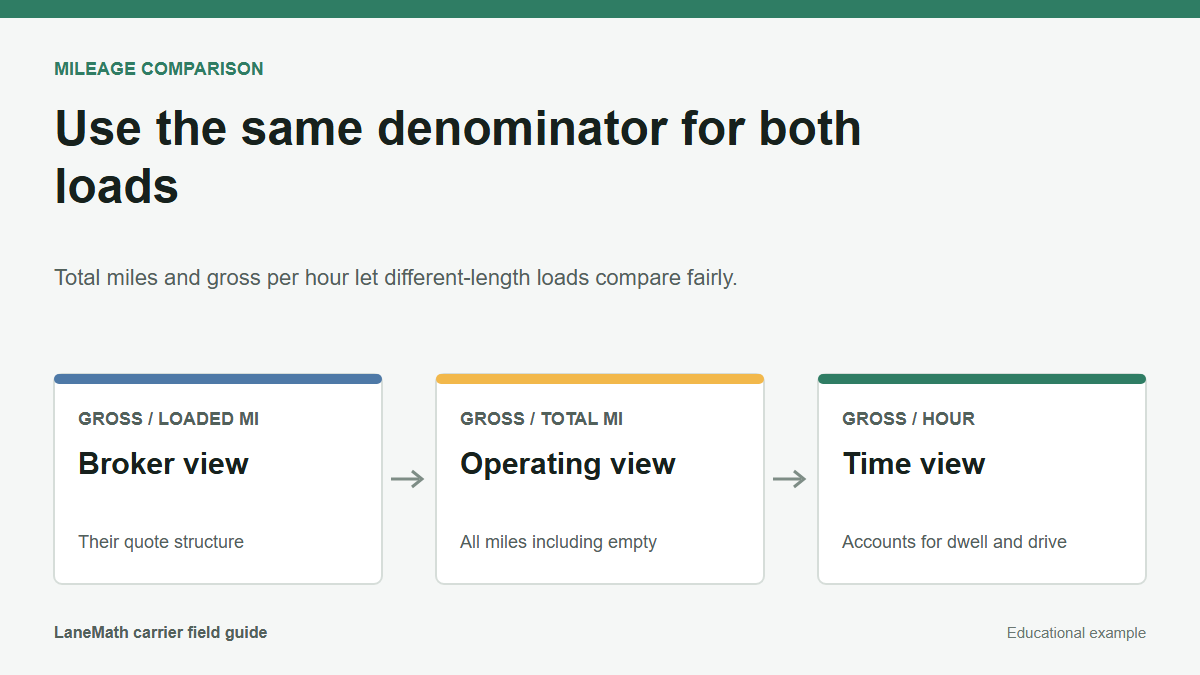
Use the same denominator
Different-mile loads become easier to compare when both are reduced to the same few rows: all-in revenue, loaded miles, empty miles, total miles, likely cost, appointment risk, and reload position. The shorter load is not automatically better. The longer load is not automatically worse.
What common unit makes the loads comparable?
Calculate gross per total mile, expected gross per calendar day, direct trip cost, and ending position for both offers. Use the same fuel and mileage assumptions. When one load has a materially different appointment or payment risk, keep that difference visible instead of forcing it into a single number.
Shorter is not automatically faster
A 300-mile live-load move can occupy more usable time than a 520-mile drop-and-hook. Comparing only distance also ignores that the longer load may deliver directly into the next freight area. Time at facilities and delivery-side position belong beside mileage.
Keep both calculations on the same sheet
Record revenue, loaded miles, all expected empty miles, trip days, appointments, direct costs, payment terms, and reload note for each offer. Mark uncertain values as ranges. After the selected load closes, replace estimates with actuals where available.
Example scenario
A 340-mile load pays $1,450 and a 590-mile load pays $2,050. The shorter load requires an overnight hold after pickup; the longer load is a same-day drop with little deadhead. Gross per loaded mile favors the short move, while gross per day and next position may favor the long one. The numbers and circumstances are educational examples; replace them with the actual route, written terms, costs, and operating limits for the load being considered.
What to check before booking
- Convert both loads to total miles and total calendar time.
- Estimate fuel, tolls, waiting risk, and next-load position.
- Use example math as a comparison aid, not a market quote.
- Write down any term that still depends on a broker reply before dispatch.
Common questions
What is the best starting point for comparing two loads with different mileage?
Convert both to total miles and an approximate time commitment, then compare on the same basis: gross per total mile and estimated trip hours. A shorter load that takes eight hours including a slow receiver may be less efficient than a longer load with a smooth delivery and a usable reload nearby.
Should a carrier always choose the higher per-mile load?
Not automatically. The per-mile rate is one metric among several. Appointment timing, receiver dwell, reload position, broker payment terms, and whether the load positions the truck for the next practical move can all change the conclusion. The goal is the load that produces the best overall outcome for the day or week, not just the highest per-mile figure.
How does appointment timing factor into comparing a shorter and longer load?
A 400-mile load with a late afternoon delivery might consume the same day as an 800-mile load with an early morning delivery the next day, depending on hours available. The shorter load is not automatically a one-day move if pickup is midday and delivery requires staying overnight. Appointment time and hours-of-service planning are part of the time cost that affects which load is more efficient.
Is there a standard formula for converting gross and miles into a daily earnings comparison?
A simple approach is to divide the gross by the estimated total hours — including deadhead, loading, driving, and delivery time — to get an approximate revenue-per-hour figure. This is not an accounting standard; it is a comparison tool. Loads that look similar by rate per mile often sort differently when compared by estimated revenue per hour of the truck's productive time.
References and methodology
- Load comparison example methodology - LaneMath Editorial Desk. Used here for: Example-only load comparison, weekly freight planning, reload uncertainty, and equipment-specific economics.Used for static planning examples based on carrier-entered assumptions, not pricing feeds or market forecasts. Last checked 2026-06-29.